Repte 2.2:Realització de backups
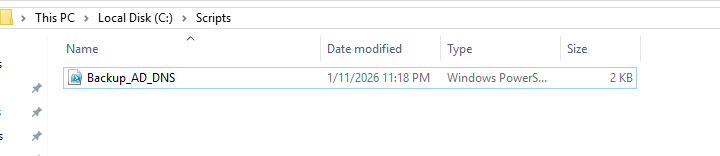
Per començar amb el backup nosaltres hem demanat un script a Gemini per fer l’automatització del backup, ja que és un requisit, per fer l’script a Windows només has d’obrir un bloc de notes (Notepad en anglès), i inserir el script, un cop està només has de desar-ho com un script i deixar-ho llest a la carpeta dels scripts:
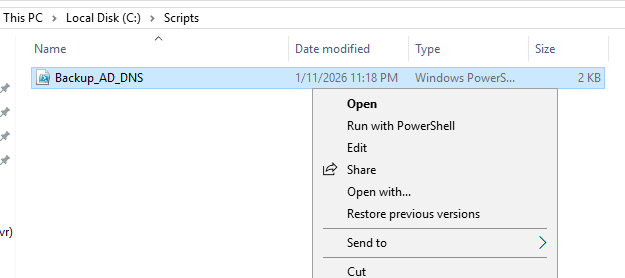
Ara nomes cal executar el script:
# ==========================================================
# SCRIPT DE BACKUP PRO+ (Active Directory & DNS)
# ==========================================================

# 1. CONFIGURACIÓN DE RUTAS
$BackupDrive = "E:"
$LogPath = "C:\Logs"             # Carpeta de informes
$LogFile = "$LogPath\Backup_Log.txt"

# 2. CREACIÓN DE ENTORNO (Si no existe)
if (!(Test-Path $LogPath)) {
    New-Item -ItemType Directory -Path $LogPath | Out-Null
}

# 3. INICIO DEL LOG
$Fecha = Get-Date -Format "dd/MM/yyyy HH:mm"
Write-Output "==========================================" | Out-File $LogFile -Append
Write-Output "INICIO DEL BACKUP: $Fecha" | Out-File $LogFile -Append
Write-Output "==========================================" | Out-File $LogFile -Append

# 4. EJECUCIÓN DEL BACKUP TÉCNICO
# El System State incluye: AD, DNS, Registro y SYSVOL
Write-Output "Ejecutando wbadmin... por favor espere." | Out-File $LogFile -Append

try {
    # Lanzamos el comando profesional de Windows
    wbadmin start systemstatebackup -backupTarget:$BackupDrive -quiet | Out-File $LogFile -Append

    if ($LASTEXITCODE -eq 0) {
        Write-Output "RESULTADO: Éxito total." | Out-File $LogFile -Append
    } else {
        Write-Output "RESULTADO: Finalizado con avisos o errores. Revisar arriba." | Out-File $LogFile -Append
    }
} catch {
    Write-Output "ERROR CRÍTICO: No se pudo iniciar wbadmin." | Out-File $LogFile -Append
}

# 5. CIERRE DEL LOG
$FechaFin = Get-Date -Format "dd/MM/yyyy HH:mm"
Write-Output "FIN DEL PROCESO: $FechaFin" | Out-File $LogFile -Append
Write-Output "" | Out-File $LogFile -Append
El log quedaria semblant a aixo :
==========================================
INICIO DEL BACKUP: 12/01/2026 02:50
==========================================
Ejecutando wbadmin… por favor espere.
wbadmin 1.0 – Backup command-line tool
(C) Copyright Microsoft Corporation. All rights reserved.
Starting to back up the system state [1/12/2026 2:50 AM]…
Retrieving volume information…
This will back up the system state from volume(s) (EFI System Partition),Recovery (499.00 MB),(C:) to E:.
Creating a shadow copy of the volumes specified for backup…
Creating a shadow copy of the volumes specified for backup…
Windows Server Backup is updating the existing backup to remove files that have
been deleted from your server since the last backup.
This might take a few minutes.
Please wait while system state files to back up are identified.
This might take several minutes…
Please wait while system state files to back up are identified.
This might take several minutes…
Please wait while system state files to back up are identified.
This might take several minutes…
Compacting the virtual hard disk for volume (EFI System Partition) (99.00 MB), completed (0%).
Found (253) files.
Found (253) files.
Found (280) files.
Found (1710) files.
Found (2490) files.
Found (3466) files.
Found (4290) files.
Found (184104) files.
==========================================
INICIO DEL BACKUP: 15/01/2026 23:07
==========================================
Ejecutando wbadmin… por favor espere.
wbadmin 1.0 – Backup command-line tool
(C) Copyright Microsoft Corporation. All rights reserved.
Starting to back up the system state [1/15/2026 11:07 PM]…
Retrieving volume information…
This will back up the system state from volume(s) (EFI System Partition),Recovery (499.00 MB),(C:) to E:.
Creating a shadow copy of the volumes specified for backup…
Creating a shadow copy of the volumes specified for backup…
Windows Server Backup is updating the existing backup to remove files that have
been deleted from your server since the last backup.
This might take a few minutes.
Please wait while system state files to back up are identified.
This might take several minutes…
Please wait while system state files to back up are identified.
This might take several minutes…
Please wait while system state files to back up are identified.
This might take several minutes…
Found (252) files.
Found (252) files.
Found (252) files.
Found (204805) files.
Found (205868) files.
Found (207091) files.
Found (207576) files.
Found (207889) files.
Found (208107) files.
Found (208277) files.
Found (208388) files.
The search for system state files is complete.
Starting to back up files…
The backup of files reported by ‘Task Scheduler Writer’ is complete.
The backup of files reported by ‘VSS Metadata Store Writer’ is complete.
The backup of files reported by ‘Performance Counters Writer’ is complete.
Overall progress: 0%.
Currently backing up files reported by ‘System Writer’…
Overall progress: 0%.
Currently backing up files reported by ‘System Writer’…
Overall progress: 1%.
Currently backing up files reported by ‘System Writer’…
Overall progress: 97%.
Currently backing up files reported by ‘System Writer’…
Overall progress: 98%.
Currently backing up files reported by ‘System Writer’…
Summary of the backup operation:
——————
The backup operation successfully completed.
The backup of the system state successfully completed [1/16/2026 8:01 AM].
Log of files successfully backed up:
C:\Windows\Logs\WindowsServerBackup\Backup-16-01-2026_07-08-02.log
RESULTADO: Éxito total.
FIN DEL PROCESO: 16/01/2026 00:01
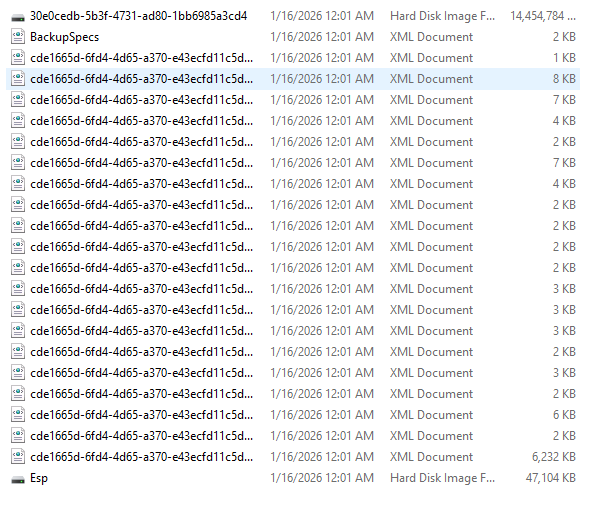
Y un acaba ja tens un backup del AD y el DNS acabat.